The private network
A WireGuard network between your servers that switches on with the second server, works behind NAT and keeps postgres:5432 working across machines.
With more than one server, your servers need to talk to each other. For example:
- an app on one server uses a database on another
- an edge forwards requests to replicas on another server
- a build machine at home pushes images to the registry
launchroom connects them with a private WireGuard network that it sets up and runs itself. You don't forward ports, copy IPs or exchange keys.
How it's built
- Headscale, an open-source coordination server for WireGuard networks, runs inside your control plane. It is installed from the start but stays idle while you have one server.
- The Tailscale client runs on each server as a launchroom system container (
lr-system-tailscale), started and configured by launchroomd. It creates atailscale0interface with a private address in100.64.0.0/10. - WireGuard encrypts every packet between servers.
The client doesn't change the rest of your machine:
- It never touches
/etc/resolv.conf. - It accepts no routes from other nodes.
- Its state lives in a launchroom-labelled Docker volume.
You don't need a Tailscale account.
It switches on with the second server
With one server, launchroom runs no private network: no client, no keys, nothing listening. When the second server is connected (and approved, if your team requires approval), the dashboard turns the network on automatically. Every server, including the dashboard's, then gets the client in its desired state and joins.
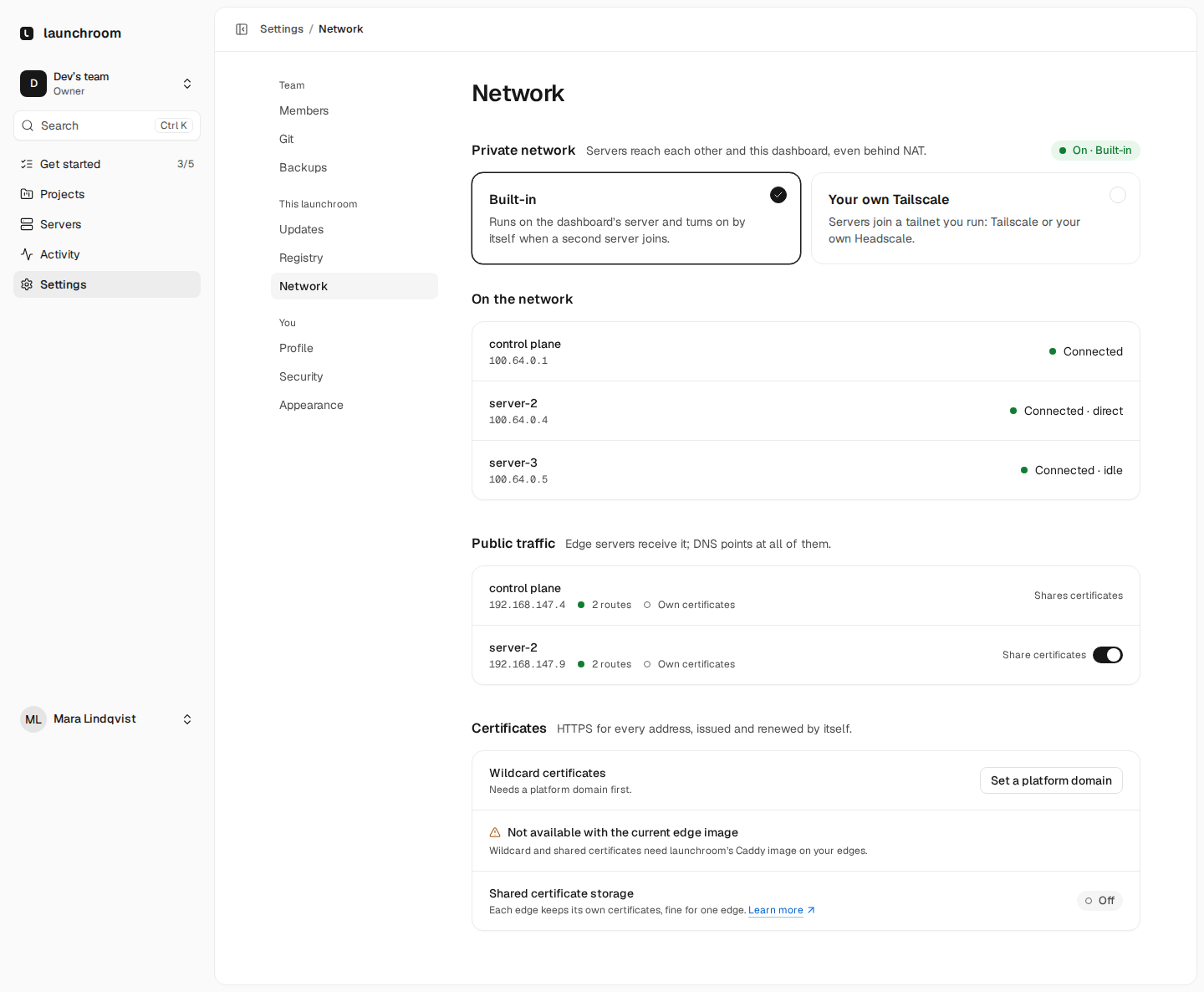
An instance owner can also turn it on earlier under Settings → Network → Private network.
Each server joins with its own key. The key:
- works once and is valid for 60 minutes
- is delivered encrypted inside that server's signed desired state
- is deleted after the server has joined
- carries the server's roles as tags, which decide what the server may reach (see below)
Behind NAT and CGNAT
Servers connect directly whenever they can. Their clients discover their public endpoints and punch through NAT, the same way for a VPS and for a mini PC behind a home router. When no direct path is possible (strict NAT, CGNAT, some corporate or mobile networks), traffic goes through a relay that runs inside your dashboard on its HTTPS port. Relayed paths work everywhere. Direct paths are faster.
Requirements:
- Every server must reach the dashboard's server on 443/TCP.
- 3478/UDP on the dashboard's server helps servers find direct paths. It is optional.
The dashboard's server therefore needs a public address. A setup where every machine is on a home network, with the
dashboard behind an internal certificate, is not supported yet. A server also needs /dev/net/tun. Without it, the
server reports the private network as unavailable, with the reason.
The Servers page shows each private link as direct (solid) or relayed (dashed), and a server's Network tab lists its peers with the path and address.
postgres:5432 works across servers
Inside an environment, services reach each other by name, like postgres:5432 or http://api:8000. When they share a
server, Docker resolves those names directly. When they are on different servers, launchroom keeps the same names
working:
- The database is published on a port in the range 31000–32999, only on its server's private address, never on a public one.
- That server's firewall accepts the port only from the private addresses of servers that run services of the same environment. WireGuard ties every address to its server's key, so the sender is known.
- On each consuming server, launchroomd runs an ambassador: a small forwarder that joins the environment's network
under the name
postgresand port 5432 and forwards to the right server. With several replicas it balances between them and skips unhealthy ones.
Your app's configuration doesn't change when replicas move between servers. A service in another environment can't reach it, even on the same machine.
The same network carries launchroom's own traffic:
- edges forwarding requests to replicas on other servers
- servers pulling and pushing images to the registry on the dashboard's server
- edges sharing certificates
Only a few ports, only from the right servers
Two layers decide what a server may reach over the private network.
Network rules (default deny). Headscale only allows:
| From | To | Ports | For |
|---|---|---|---|
| Every server | The dashboard's server | 443, 5000 | launchroomd's API, the image registry |
| Edges | Servers that run apps | 31000–32999 | Requests to replicas on other servers |
| Servers that run apps | Each other | 31000–32999 | Services using services on other servers |
| Edges | The dashboard's server | 6379 | Shared certificate storage |
| Every server | Every server | 7400 | Link quality measurements |
Each server's firewall. launchroomd's nftables rules on every server accept only those ports from the private network, and each published service port only from the servers that need it. Everything else arriving over the private network is dropped, for example SSH, Caddy's admin API or a database bound on the host. App containers can't reach the private network directly. Only the ambassador can, and only to its listed destinations.
Joining the network grants no trust
Joining the private network lets a server send packets to the ports above. It grants nothing else:
- Every instruction a server follows is signed by the control plane.
- Every request a server makes is signed with its own key.
- Both signatures are checked regardless of the network a message arrives on.
A machine that joined your network without permission still couldn't fetch another server's desired state, read its secrets or start a container anywhere.
Revoking a server removes it from the private network at the same time.
Link quality
launchroomd measures the private links itself: a round trip to every peer each minute, and a speed test of up to 16 MB every 6 hours. Both ends of a measurement authenticate with their launchroomd keys. The probe listens only on the server's private address (port 7400), and only for its listed peers.
The results appear on the Servers topology ("0.4 ms · 480 Mbit/s") and on each server's Network tab with a 24-hour chart. Turn the checks off per server with Network checks on its Settings tab. See Home machines.
Bring your own Tailscale
If you already run a tailnet, on Tailscale or on your own Headscale, your servers can join it instead. Open Settings → Network → Private network, choose Your own Tailscale and enter:
- the login server, for example
https://controlplane.tailscale.comor your Headscale's address (HTTPS only) - an auth key that may register several machines. Use one that expires and is limited to the tags launchroom asks for. It is stored encrypted and only sent to the dashboard's server and to servers an instance owner added or approved.
The page shows the recommended access rules, the same as the table above. In your own tailnet you apply the rules yourself, and you remove a revoked server's node yourself. launchroomd's firewall on each server stays in place in both setups.
Things to know
- The private network keeps using the dashboard's original install address, even after you move the dashboard to a new domain. No server has to rejoin.
- While the dashboard is down, servers that already know each other keep their connections.