Concepts
The words launchroom uses for teams, projects, services, connections, environments, previews, staged changes, deployments and servers.
This page defines the terms the dashboard and the rest of the docs use. They are listed in this order:
- who you are
- what you deploy
- how it changes
- where it runs
Team
A team owns projects, servers, git connections and settings. Every member has one role:
- Owner and Admin manage servers and members.
- Developer deploys and edits.
- Viewer reads.
Revealing secrets, opening a console and querying databases are separate permissions on top of the role. See Teams and roles.
The person who ran the first-run setup is the instance owner. The instance owner manages launchroom itself: updates, the dashboard domain, and network and backup settings for the whole install.
Project and canvas
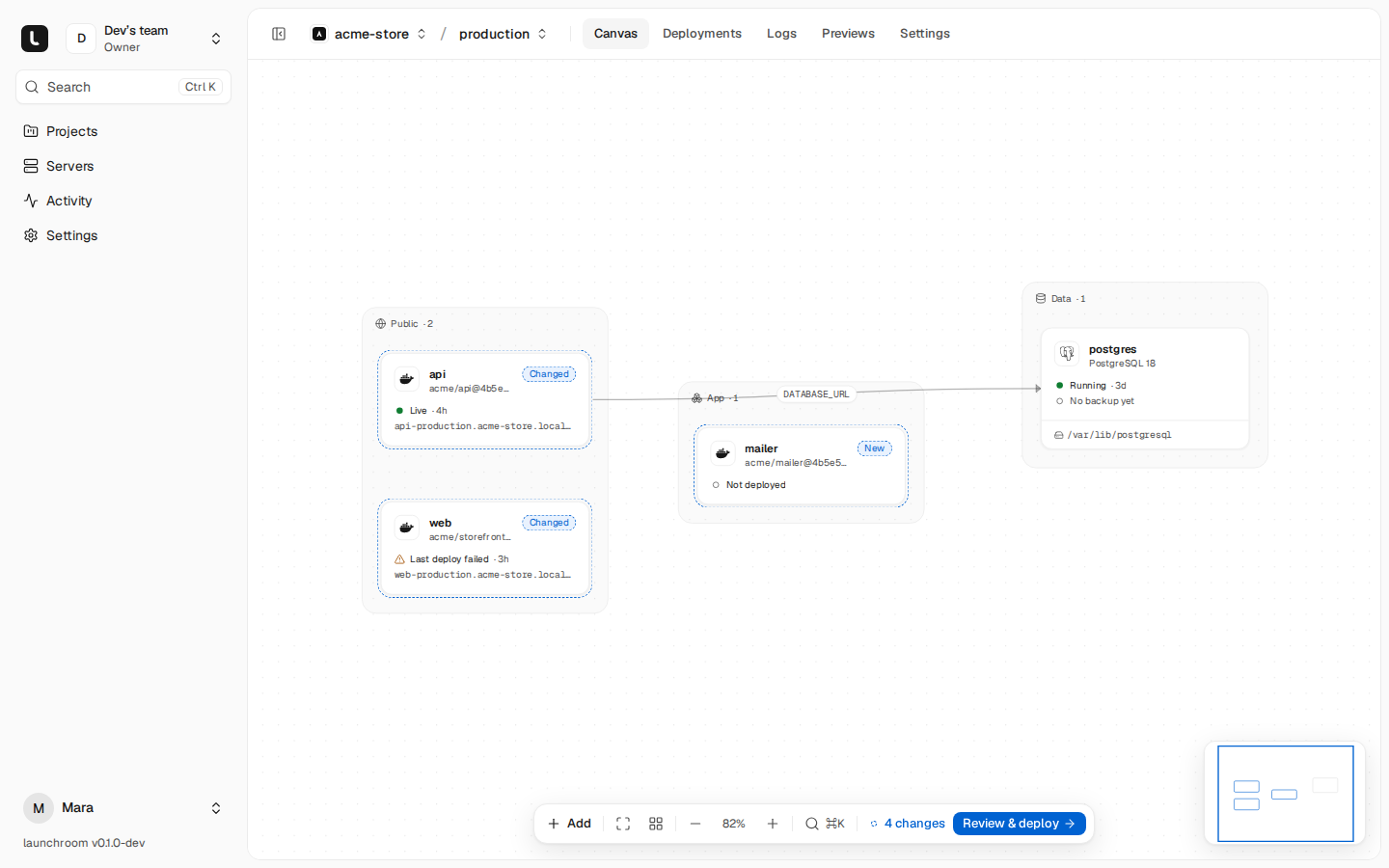
A project groups everything one product needs: its apps, workers, databases and the connections between them. Each project is shown as a canvas, a diagram of its services and their status. You add, connect and configure services on the canvas.
Service
A service is one box on the canvas. There are five kinds:
| Kind | Source | Example |
|---|---|---|
| App | A git repository, built by launchroom | A Next.js site, a Laravel API, a Go server |
| Image | A Docker image from a registry, pulled as is | Umami, n8n, a vendor's image |
| Database | A managed engine: PostgreSQL, MySQL, Redis, Valkey, MongoDB or ClickHouse | postgres with backups and a data browser |
| Worker | The image of an app, with a different command | A queue worker |
| Cron | The image of an app, a command and a schedule | A nightly report |
Workers and crons reuse their app's build. One push builds once and updates the web process, the queue and the scheduler together. See Canvas and services.
Connection
A connection is the line you draw from one service to another, for example from api to postgres. It adds the
variables the consumer needs, under the names its framework expects (DATABASE_URL, or DB_HOST, DB_PASSWORD and so
on for Laravel). The variables are references to the other service, not copied values. Services in the same environment
reach each other by name, like postgres:5432, on a private network. See Variables.
Environment
An environment is a complete copy of a project's services with its own variables, domains, data and servers. Every
project has production, and you can add persistent ones such as staging. Environments are isolated from each
other: staging's postgres is a different database from production's. Compare & promote carries tested changes from one environment to another.
See Environments.
Preview
A preview is a short-lived environment for a pull request, copied from a base environment. It has its own URL and, by default, a new empty database. It can use a copy of another environment's database instead. launchroom removes it when the pull request closes. See Previews.
Staged changes
Edits don't go live one by one. Changing a variable, adding a service, drawing a connection or changing replicas creates staged changes. They are collected per environment and shown with their effect (new service, rebuild or restart). Review & deploy applies them together, with an optional message.
These apply immediately instead:
- domain changes
- git pushes
- rollbacks
- scaling to zero
Deployment
A deployment is one version of one service going live. It records the commit, the configuration it was deployed with and the image it runs. It never changes afterwards. Every build produces a new image, referenced by its digest. Rolling back runs an earlier deployment's exact image again.
A deployment moves through Plan, Build, Roll out, Health check and Switch traffic. The new version starts next to the old one and takes traffic only after it passes its health check. If anything fails, the old version keeps serving.
Server and roles
A server is any Linux machine with Docker that you connected, such as a VPS, a dedicated server or a mini PC at home. Each server has roles:
- Run apps: runs your apps, workers and databases.
- Serve traffic: receives public traffic on ports 80 and 443 and serves HTTPS for every app. Called an edge.
- Build: turns pushes into images.
Roles combine freely. The first server has all three. Servers can have labels such as zone=fsn1 that placement rules
use. See Roles and placement.
Control plane
The control plane is the dashboard and what it needs to run (database, queue, registry, private network coordination), installed on your first server. It stores what you want to run and tells every server about it. Your apps don't depend on it to serve requests. They keep serving while it is down. See Architecture.
launchroomd
launchroomd is the small program on every server that connects out to the control plane, receives a signed description of what the server should run and applies it with Docker. See launchroomd.
Private network
When a second server joins, launchroom turns on a private WireGuard network between your servers. A service on one server can then reach a database on another by its usual name, even behind NAT. See The private network.
Deploy your first app
Deploy a live app with Postgres on a fresh install: connect GitHub, import a repository, check the plan, connect a database and deploy.
Moving to launchroom
Move your apps from your old platform onto a launchroom server one at a time, later move launchroom to another machine, and add a home machine for builds.