Client certificates
Servers prove who they are with a certificate before the dashboard reads their request. Roll it out in three steps, Off, Check and Require.
Every request a server sends to the dashboard is already signed with that server's own key. Client certificates (mutual TLS) add a second, independent check in front of it. The control plane's web server refuses server traffic without a valid certificate at the connection level, before the dashboard parses anything. A stolen signing key alone is then not enough to talk to your dashboard.
What it protects
| Without certificates | With Require | |
|---|---|---|
| Server requests to the dashboard | Signed with the server's key, checked by the dashboard | Also need a valid certificate of this launchroom, checked at the connection |
| Someone with a copied server key | Can send signed requests until you revoke the server | Is refused without the matching certificate |
| Browsers, API, CLI, Git webhooks, the installer | Unaffected | Unaffected |
Certificates are an extra layer. Request and response signatures stay on in every mode. Client certificates never replace them.
How it works
- Your launchroom runs its own certificate authority. Its private key never leaves the control plane and is stored encrypted.
- Each server creates its own key, which never leaves that server, and asks the dashboard for a certificate over the signed channel it already uses.
- Certificates are valid for 7 days. launchroomd renews automatically about two thirds of the way through, with a new key each time, and switches over without a restart or dropped connections.
- The control-plane server's own launchroomd talks to the dashboard over loopback and doesn't need a certificate.
Servers start asking for certificates once they talk to the dashboard over HTTPS and run a launchroomd version that supports it.
Roll it out
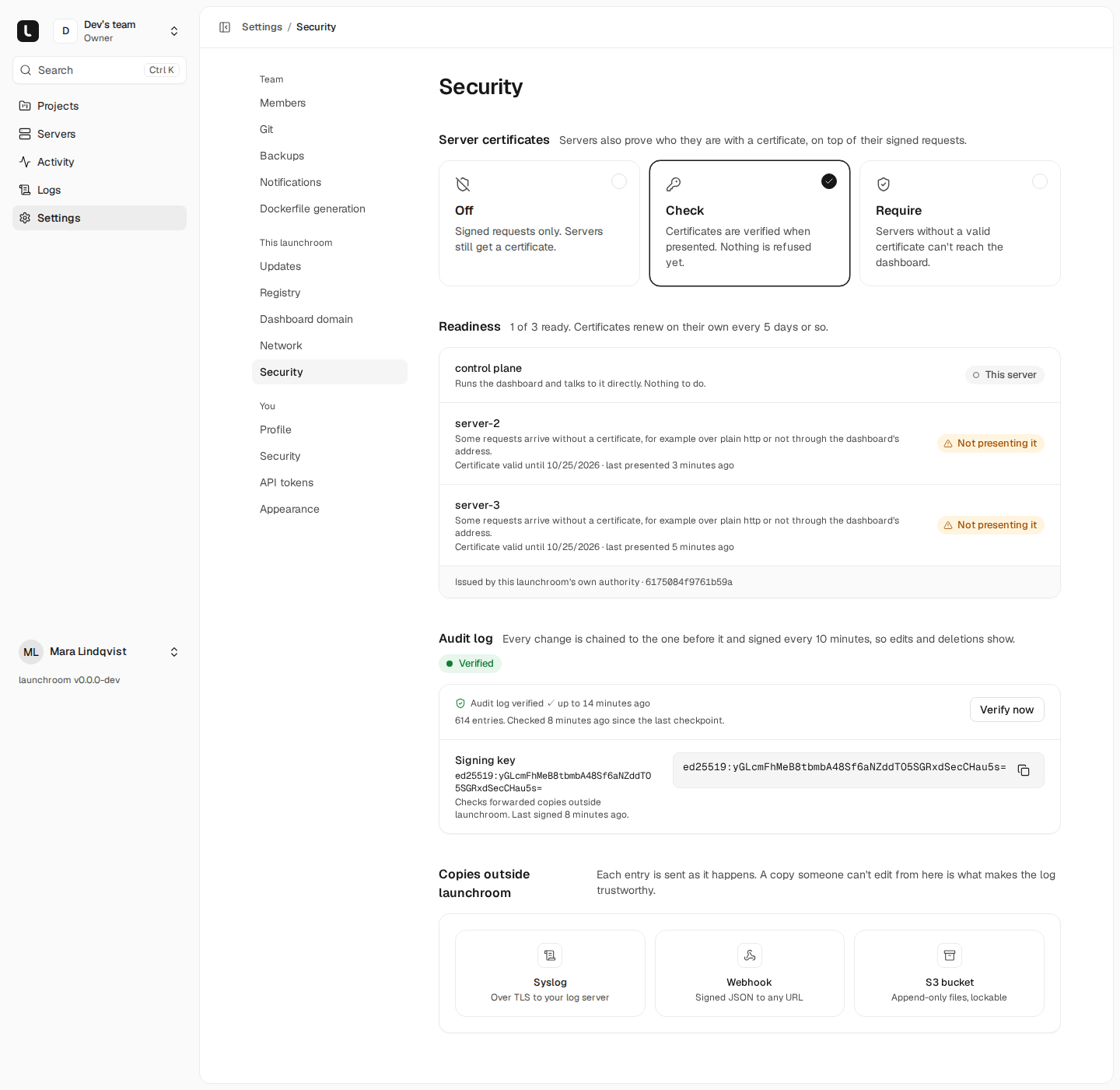
Open Settings → Security in the This launchroom group (instance owners only). Under Server certificates there are three modes:
| Mode | What happens |
|---|---|
| Off | Signed requests only. Servers still get a certificate. |
| Check | Certificates are verified when presented. Nothing is refused yet. |
| Require | Servers without a valid certificate can't reach the dashboard. |
Switch to Check
Choose Check. Nothing is refused, and the dashboard records which servers present a valid certificate.
Wait until every server is Ready
The Readiness card lists each server with its state. Give servers a few minutes after switching. Each row shows when the server last presented its certificate.
Switch to Require
When every server is ready, choose Require. From now on, server requests without a valid certificate are refused.
If you choose Require while some servers aren't ready, launchroom lists the servers that will be refused and asks you to confirm with your password. Leaving Require asks for confirmation too. Every change is recorded in the audit log.
Readiness states
| State | Meaning |
|---|---|
| Ready | Presented a valid certificate recently and nothing without one since |
| This server | The control plane itself, which talks to the dashboard over loopback |
| Has a certificate | In Off mode: the server has one, but presenting it isn't observed |
| Waiting for a certificate | The server hasn't received one yet |
| Not presenting it | The server talks to the dashboard without a certificate, for example over plain HTTP or not through the dashboard's HTTPS address |
| Needs an update | The server's launchroomd is too old. Update it from Settings → Updates |
| Offline | The server hasn't been in contact |
Servers that were offline
A server that was offline longer than 7 days comes back with an expired certificate. Under Require it can't renew on its own, because renewing needs a valid certificate. On the Readiness card, choose Allow a new certificate for that server. This opens a one-hour window in which the server may get a fresh certificate, and is audited.
New servers you add while Require is on get their first certificate during enrollment, without extra steps.
Revoking a server
Revoking a server (or replacing it) also revokes its certificates. The dashboard refuses them from the next request. Certificates are valid for only 7 days, so a certificate that slipped past expires soon after.
If you lock yourself out
If Require turns out to refuse servers you need, switch back to Check or Off in the dashboard. If the dashboard is unreachable, an operator with access to the control-plane server can turn certificates off from the command line:
cd launchroom
docker compose exec dashboard php artisan launchroom:client-certificates off
Limits
- The connection check happens at the control plane's web server, which validates the chain and the validity period. Revocation is decided by the dashboard, which is always consulted.
- The realtime connection servers use for instant nudges isn't covered. It carries no instructions of its own. A nudge only makes a server fetch its signed state over the certificate-protected API. Console and Data sessions are authenticated end to end.
Two-factor sign-in
Protect your account with an authenticator app and recovery codes, or sign in with a passkey. Recommended for everyone, required for no one.
Audit log
Every change, deploy, sensitive action and session is recorded in a hash-chained, signed log you can verify and copy outside launchroom.