Point-in-time recovery
Restore a PostgreSQL database to any second inside its window instead of the last nightly snapshot. Changes are shipped every 30 seconds.
Daily backups lose up to a day of data. With point-in-time recovery on, launchroom keeps every change to a PostgreSQL database, so you can restore it to any second inside the recovery window, for example to the moment before a bad migration or a mistaken DELETE. Data loss drops to about a minute.
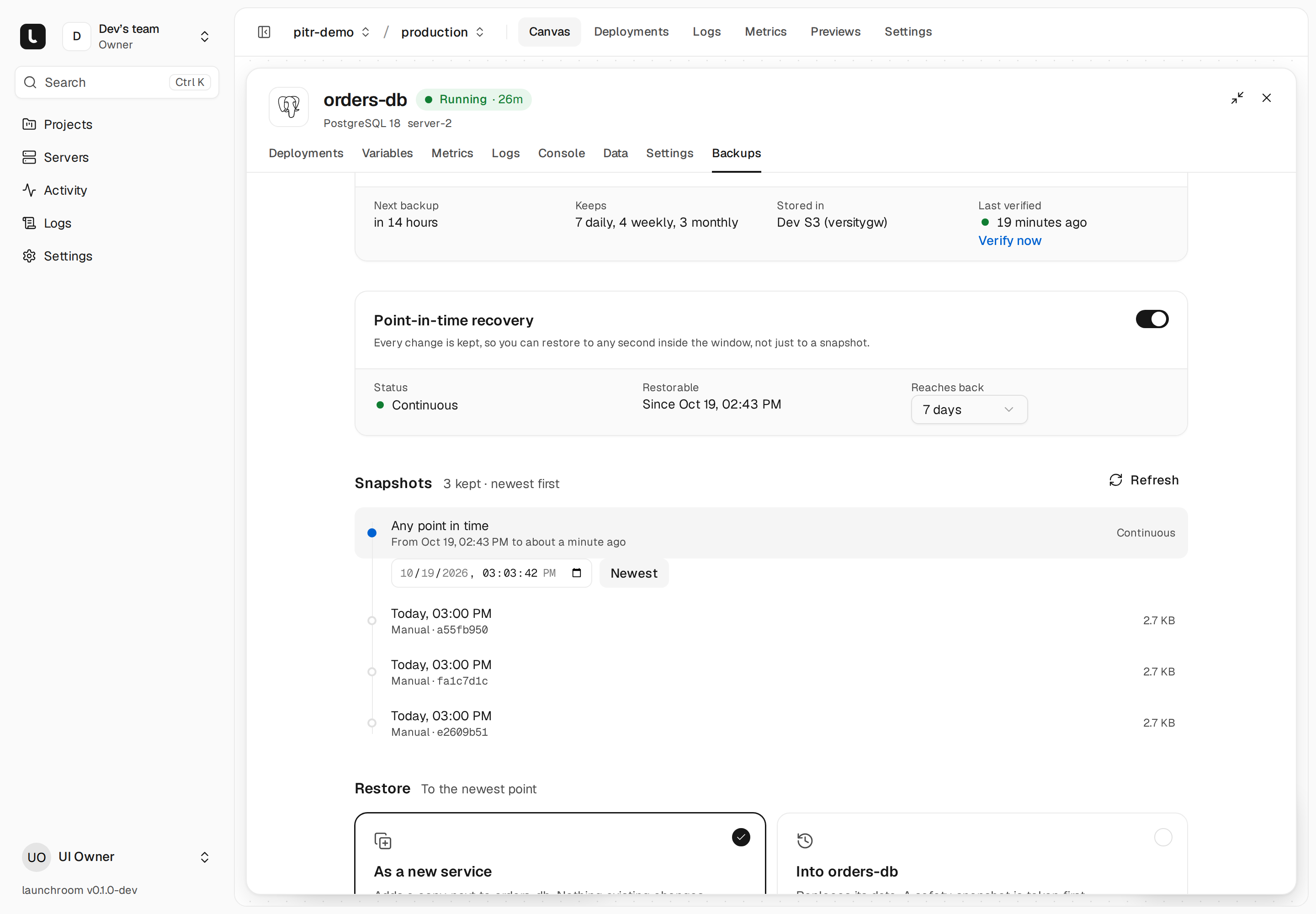
Point-in-time recovery is available for PostgreSQL 15 and newer (launchroom has 16, 17 and 18) running with its default start command. Other engines keep their daily dumps.
How it works
PostgreSQL writes every change to its write-ahead log (WAL) before applying it. With point-in-time recovery on:
- PostgreSQL archives each completed WAL segment into a folder on the database's own volume, using its bundled
basic_archivemodule. A segment is closed at least once a minute, even when the database is quiet. - Every 30 seconds, launchroomd ships the archived segments into the database's backup destination with restic, encrypted like every other backup, then deletes the files it stored. If an upload fails, nothing is deleted and PostgreSQL keeps the segments until they are shipped.
- Once a day, launchroom takes a base backup of the whole database with
pg_basebackup. It also takes one right after you turn the feature on and after an in-place restore.
A restore starts from the newest base backup before the time you picked and replays the WAL up to that second. Shipping runs on the server itself, so it keeps going while the dashboard is down.
Your daily dumps keep running alongside. They restore across PostgreSQL versions and are the source for preview clones.
Turning it on
Open the database's Backups tab and turn on Point-in-time recovery. Owners and admins can change it, and the change is audited.
- The database needs a backup destination (its schedule's, otherwise the team's default).
- PostgreSQL restarts once to turn archiving on.
- Choose How far back the window reaches: 1 to 35 days, 7 by default.
The tab shows "Taking the first base backup" until the window opens, then the window itself, from the oldest kept base backup to about a minute ago.
Restoring to a point in time
In the Backups tab's snapshot list, choose Any point in time (it shows the window, for example "From Oct 12, 03:00 to about a minute ago"). Pick a date and time down to the second, or To the newest point. Times outside the window are refused.
Then choose how to restore:
As a new service (the safe default)
launchroom adds a copy of the database next to the original in the same environment and restores into it. Nothing else changes. The copy has its own generated credentials. Inspect it in the Data tab, or point a test app at it.
When the copy looks right, swap it in. In that environment, every service connected to the original is connected to the copy, the original's domains and own connections move to it, and the original's removal is staged. Nothing changes on your servers until you deploy those staged changes. Discard undoes the swap. A swap asks you to type the original's name.
Into this service (in place)
This replaces the database's data with the state at that second. Plan it as a maintenance window:
- launchroom takes a safety snapshot first. If that fails, nothing changes.
- The services connected to the database in that environment are stopped, so nothing writes while the data is replaced. Their routes return errors meanwhile.
- The base backup is laid into the emptied volume and PostgreSQL replays the WAL to your chosen second in a throwaway container with no network.
- The database starts, its connected services start again (also if the restore failed), and a new base backup starts the window over.
You confirm by typing the database's name. The restore history shows the point the database was restored to ("to Oct 19, 14:43").
Restoring in place discards later changes
Everything written after the chosen second is gone from the live database. To undo the restore, use the safety snapshot taken before it. Restore as a new service first when you're not sure.
Retention
Each day launchroom keeps the base backups and WAL needed to cover the window (plus one day of margin), and always keeps the newest base backup. Older ones are removed and the repository is pruned.
Verification and alerts
The weekly verification of a database with point-in-time recovery restores its newest base backup with all its WAL into a throwaway container, replays to the newest point and checks the result with pg_amcheck.
The A backup fails alert also covers shipping: it warns when WAL is due but hasn't been stored for 15 minutes, for example because the destination is unreachable. It resolves once shipping catches up.
Next steps
Backups
Scheduled backups, encrypted on your servers with restic, stored in any S3-compatible bucket and verified every week. launchroom backs up its own state too.
Restore and disaster recovery
Restore one database or volume in a few clicks, or bring back a whole launchroom on a new server with one command and a guided checklist.